Deploy MLflow Models to Serverless GPUs with Modal

Deploying an MLflow model to a GPU endpoint typically means writing a Dockerfile, configuring GPU drivers, building an HTTP server, and wiring auto-scaling rules. That's a lot of infrastructure work per model, especially for workloads where you just need a GPU endpoint that scales to zero when idle.
mlflow-modal-deploy is a community deployment plugin that adds Modal's serverless GPU platform as a target in MLflow's plugin architecture. It's listed in MLflow's official Community Plugins documentation and documented in MLflow's deployment guides. A single create_deployment() call takes any pyfunc model from an MLflow experiment to a live, auto-scaling GPU endpoint. The plugin handles dependency extraction, code generation, and GPU configuration automatically.
Why Modal?
Modal provides serverless GPU infrastructure that scales from zero to many containers without managing any servers. You pay only for the compute time you use. For ML teams, this means GPU endpoints for bursty inference, rapid prototyping, batch experiments, or production serving without the overhead of provisioning and maintaining GPU clusters.
Before this plugin, there was no way to use MLflow's standard get_deploy_client() API to target serverless GPUs. The mlflow-modal-deploy plugin bridges that gap. It registers through MLflow's standard plugin interface, so teams can use get_deploy_client("modal") alongside their existing deployment targets without changing their workflow.
Getting Started
Install the plugin alongside MLflow:
pip install mlflow-modal-deploy
The plugin requires Modal authentication. If you haven't set up Modal yet:
modal setup
Deploy a Text Generation Model to GPU
Here's the full workflow: log a transformer model to MLflow and deploy it to a Modal GPU endpoint with auto-scaling and streaming.
import mlflow
from mlflow.deployments import get_deploy_client
from transformers import pipeline

# Load a text generation model
generator = pipeline("text-generation", model="distilgpt2")

with mlflow.start_run() as run:
    mlflow.transformers.log_model(generator, name="text-generator", task="text-generation")
    run_id = run.info.run_id

# Deploy with GPU, auto-scaling, and streaming
client = get_deploy_client("modal")
deployment = client.create_deployment(
    name="text-generator",
    model_uri=f"runs:/{run_id}/text-generator",
    config={
        "gpu": "T4",
        "memory": 4096,
        "min_containers": 0,        # Scale to zero when idle
        "max_containers": 10,       # Scale up under load
        "scaledown_window": 120,    # 2 min cooldown
        "concurrent_inputs": 4,     # 4 requests per container
    },
)
Behind that single call, the plugin handles five steps that would otherwise require a custom deployment script per model:
- Downloads the model artifacts from the specified run
- Extracts dependencies from
requirements.txtorconda.yaml - Auto-detects the Python version from the model's environment
- Generates a complete Modal application with the correct GPU, scaling, and serving configuration
- Uploads model files to a Modal Volume and deploys the application
Each of these steps typically involves custom code: parsing conda environments, generating Dockerfiles, configuring HTTP servers. The plugin handles all of it from the information MLflow already stores with every logged model.
Make Predictions
Once deployed, predictions work through the standard MLflow Deployments API:
predictions = client.predict(
    deployment_name="text-generator",
    inputs={
        "prompt": "Machine learning deployment is",
        "max_new_tokens": 50,
    },
)
print(predictions)
The deployed endpoint also supports streaming out of the box:
# Streaming predictions (Server-Sent Events)
for chunk in client.predict_stream(
    deployment_name="text-generator",
    inputs={
        "prompt": "Machine learning deployment is",
        "max_new_tokens": 50,
    },
):
    print(chunk, end="", flush=True)
If the model supports predict_stream natively (LLMs, chat models, LangChain), chunks arrive incrementally. For models that don't (sklearn, XGBoost), the endpoint falls back to returning the full prediction as a single SSE chunk, so the same predict_stream() API works for any model type.
Deployments can also be managed via CLI:
# List all Modal deployments
mlflow deployments list -t modal

# Get deployment details
mlflow deployments get -t modal --name text-generator

# Clean up
mlflow deployments delete -t modal --name text-generator
GPU Configuration
Matching GPU resources to model size directly affects both cost and latency. Over-provisioning wastes compute budget, while under-provisioning causes out-of-memory failures or slow inference. The plugin lets you specify GPU requirements declaratively, supporting all GPU types available on Modal from T4 through B200.
For large models that benefit from multi-GPU parallelism:
config={
    "gpu": "H100:4",       # 4x H100 GPUs
    "memory": 32768,
    "startup_timeout": 600, # 10 min for large model loading
}
When GPU availability varies, a fallback list lets Modal pick the first available option:
config={
    "gpu": ["H100", "A100-80GB", "A100-40GB"],
}
The plugin supports all GPU types available on Modal:
| GPU | VRAM | Typical use case |
|---|---|---|
| T4 | 16 GB | Small models, batch inference, lightweight serving |
| L4 | 24 GB | Medium models, real-time inference with good cost efficiency |
| L40S | 48 GB | Medium-large models, image generation, video inference |
| A10 / A10G | 24 GB | Training and inference, general-purpose GPU workloads |
| A100 | 40 GB | Large models, mixed training and inference workloads |
| A100-40GB | 40 GB | Large model fine-tuning, distributed training |
| A100-80GB | 80 GB | Very large models that exceed 40 GB VRAM |
| H100 | 80 GB | LLM serving, high-throughput inference, largest models |
| H200 | 141 GB | Largest open-weight models (Llama 70B+, Mixtral) |
| B200 | 180 GB | Next-generation workloads, full-precision large models |
| RTX-PRO-6000 | 96 GB | Professional visualization and inference workloads |
GPU names also support a + suffix for upgrade fallback (e.g., "B200+" allows Modal to fall back to B300 if available), and ! for dedicated allocation (e.g., "H100!" prevents auto-upgrade).
Auto-Scaling Configuration
For workloads with variable traffic (demos, batch experiments, intermittent inference), fine-grained scaling control helps manage costs. The plugin exposes Modal's auto-scaling API, so you can tune cost and latency trade-offs per deployment:
deployment = client.create_deployment(
    name="production-model",
    model_uri=f"runs:/{run_id}/model",
    config={
        "gpu": "T4",
        "min_containers": 1,         # Keep 1 warm (no cold starts)
        "max_containers": 20,        # Scale up to 20 under load
        "scaledown_window": 120,     # Wait 2 min before scaling down
        "concurrent_inputs": 4,      # Handle 4 requests per container
        "target_inputs": 2,          # Autoscaler target concurrency
        "buffer_containers": 2,      # Extra idle containers under load
    },
)
Setting min_containers: 0 (the default) enables true scale-to-zero: no running containers and no cost when the endpoint is idle.
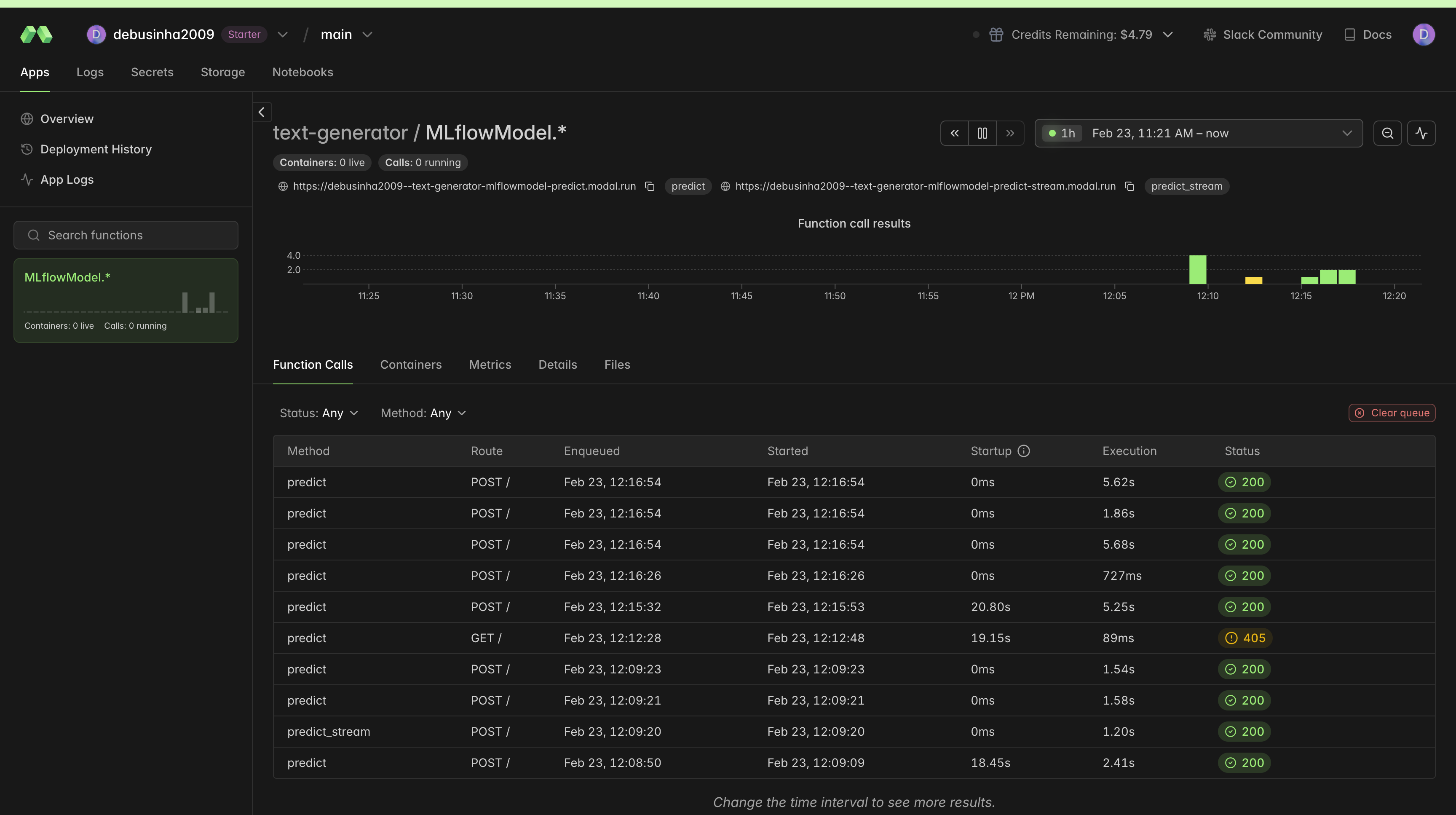
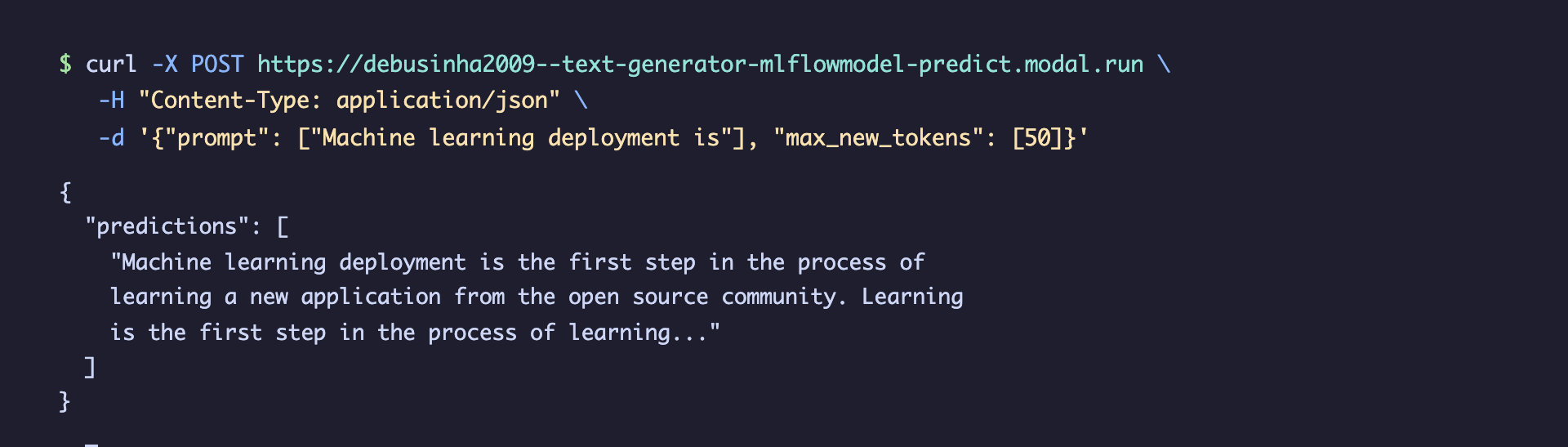
The endpoint can also be called directly via curl:
Dynamic Batching
GPU utilization drops sharply when processing one request at a time. The fixed cost of a kernel launch dominates, and most of the GPU's parallel compute capacity sits idle. For throughput-sensitive workloads, the plugin supports Modal's dynamic batching, which automatically groups incoming requests into batches before passing them to the model:
deployment = client.create_deployment(
    name="batch-model",
    model_uri=f"runs:/{run_id}/model",
    config={
        "gpu": "A100-80GB",
        "enable_batching": True,
        "max_batch_size": 32,
        "batch_wait_ms": 50,
    },
)
Batching pays off most for GPU models because the marginal cost of extra inputs in a batch is small compared to the fixed overhead of each kernel launch.
Automatic Dependency Management
Dependency mismatches are one of the most common causes of deployment failures. A model trained with transformers==4.38.0 breaks silently when served with 4.40.0. MLflow already captures the exact environment when you log a model, and the plugin reads that metadata to reproduce it in the deployment container automatically:
requirements.txt(preferred): Parsed directly from the MLflow model artifactsconda.yaml(fallback): Pip dependencies extracted from the conda environment specification- Wheel files: Any
.whlfiles in the model'scode/directory are uploaded to the Modal Volume and installed at container startup - Python version: Auto-detected from
conda.yaml(e.g.,python=3.10.0becomes Python 3.10 in the container)
For packages not captured in the model's environment (monitoring tools, custom libraries), use extra_pip_packages:
config={
    "extra_pip_packages": ["prometheus-client", "my-custom-lib>=2.0"],
}
For private PyPI registries, create a Modal secret with your credentials and reference it:
modal secret create pypi-auth PIP_INDEX_URL="https://user:token@pypi.corp.com/simple/"
config={
    "modal_secret": "pypi-auth",
    "extra_pip_packages": ["my-private-package"],
}
How It Works
Under the hood, the plugin generates a complete Modal application file tailored to the model and configuration. Here's a simplified view of the deployment pipeline:
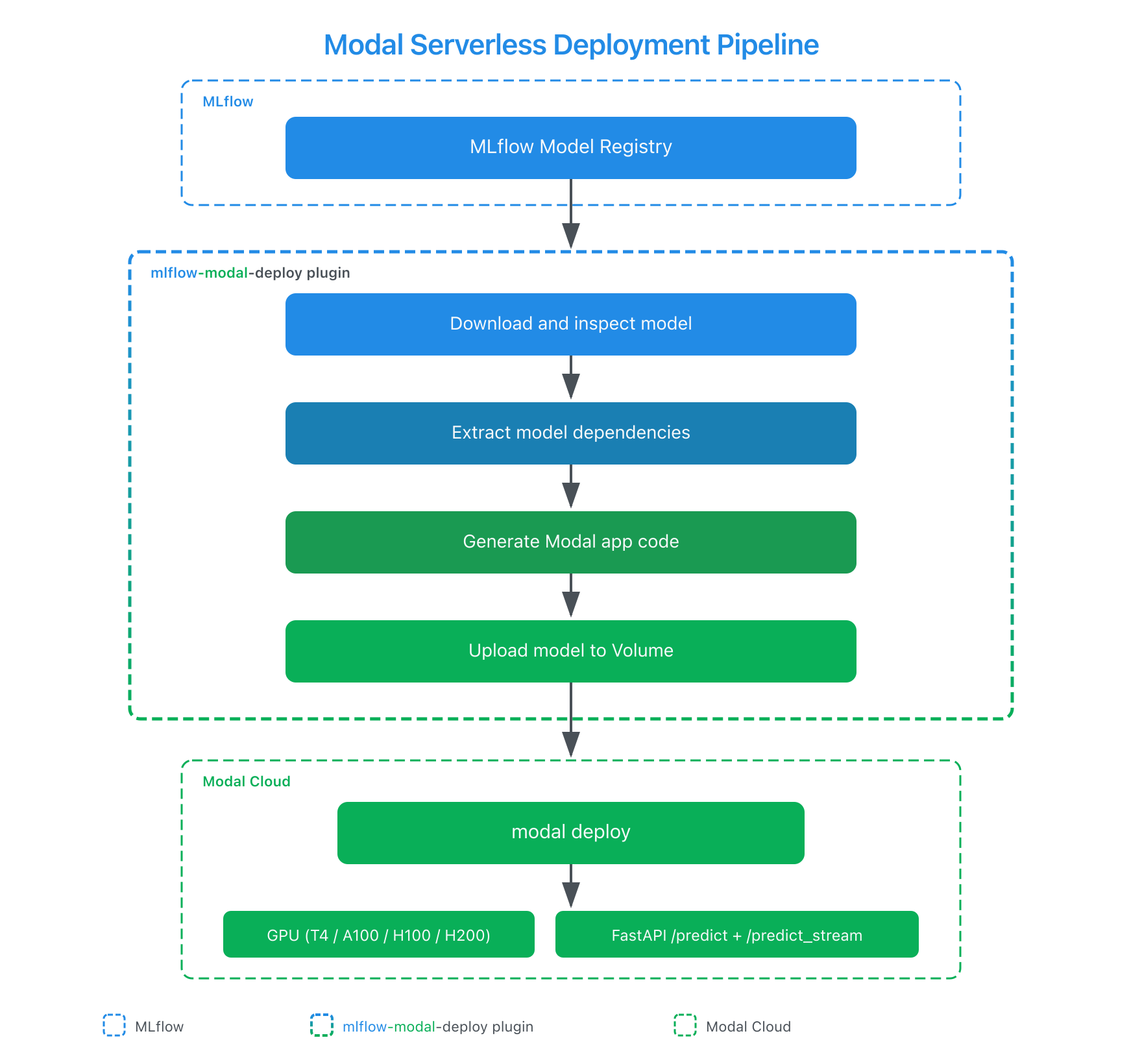
The generated Modal application uses @modal.fastapi_endpoint for HTTP serving and @modal.enter() for one-time model loading. Several design decisions in the generated code address problems that are easy to miss when building deployment tooling manually:
- Volume-based model storage separates model artifacts from the runtime image. Redeploying with a new model version only updates the volume contents (seconds), not the entire container image (minutes). That difference matters for teams iterating quickly on model versions.
uv_pip_installfor dependency installation, following the Modal 1.0 best practice. This is significantly faster thanpip installfor large dependency trees common in ML projects.- Security-validated deployment names prevent code injection in the generated Python file. Since the plugin generates executable Python code from user inputs, every string that enters the generated code is validated against a strict regex and escaped. Without this, a malicious deployment name could inject arbitrary code.
- Graceful streaming fallback ensures
predict_streamworks for all model types. Models that support native streaming (LLMs, chat models) stream incrementally. Models that don't (sklearn, XGBoost) return the full prediction as a single SSE event. The caller doesn't need to know which type it's talking to.
Managing Deployments
The full deployment lifecycle is supported through both Python and CLI:
# Update an existing deployment with a new model version
client.update_deployment(
    name="text-generator",
    model_uri=f"runs:/{run_id}/text-generator",
    config={"gpu": "L4"},  # Upgrade GPU
)

# List all deployments
for dep in client.list_deployments():
    print(f"{dep['name']}: {dep.get('state', 'unknown')}")

# Clean up
client.delete_deployment(name="text-generator")
Workspace targeting is supported for teams using multiple Modal environments:
# Deploy to a specific Modal workspace
client = get_deploy_client("modal:/production")
What's Next
The plugin continues to evolve alongside both MLflow and Modal. Areas of active development include:
- Model signature validation at deploy time to catch input/output mismatches early
- Cost estimation based on GPU type and scaling configuration
- A/B testing support through Modal's traffic splitting capabilities
Try it out:
pip install mlflow-modal-deploy
File issues or contribute at github.com/debu-sinha/mlflow-modal-deploy.
Resources
- mlflow-modal-deploy on PyPI
- GitHub Repository
- MLflow Deployments API Documentation
- MLflow Plugins Guide
- Modal Documentation
- Modal GPU Reference
Provenance
I developed mlflow-modal-deploy as an independent open-source project to extend MLflow's deployment plugin ecosystem with a serverless GPU target, complementing existing options like Databricks Model Serving and SageMaker. The plugin is listed in MLflow's official Community Plugins documentation and covers the full deployment lifecycle, from model artifact extraction through GPU-accelerated serving with auto-scaling, across 11 GPU types, 111 tests, and Python 3.10 through 3.13.
Technical review was provided by the Modal team during development. The plugin is published on PyPI and validated against MLflow 3.x and Modal 1.0.
Related artifacts:
- Upstream MLflow documentation PR (merged, reviewed by MLflow maintainers)
- Plugin repository (Apache 2.0, 14 releases)